
Schedule production
Scheduling means assigning "work order + operation" to a specific station, so the workstation knows what to do. This page covers how to add a schedule, drag operations onto stations, and actions such as start and pause.
Before you start
- The work order exists and is not complete. See Create work orders.
- The product has an approved released process. See Submit and review a process.
- The stations you want to schedule have workstations bound. See Maintain lines and stations.
Steps
- Open 生产管理 (Production) › 产线排产 (Line scheduling) and click 新增 (Insert).
- Fill in the top half as shown in the table below.
- Below that is the station layout + operation cards: drag an operation card onto a station, or click an operation and then a station. One station gets one operation. You must assign at least one before you can submit.
- Save.
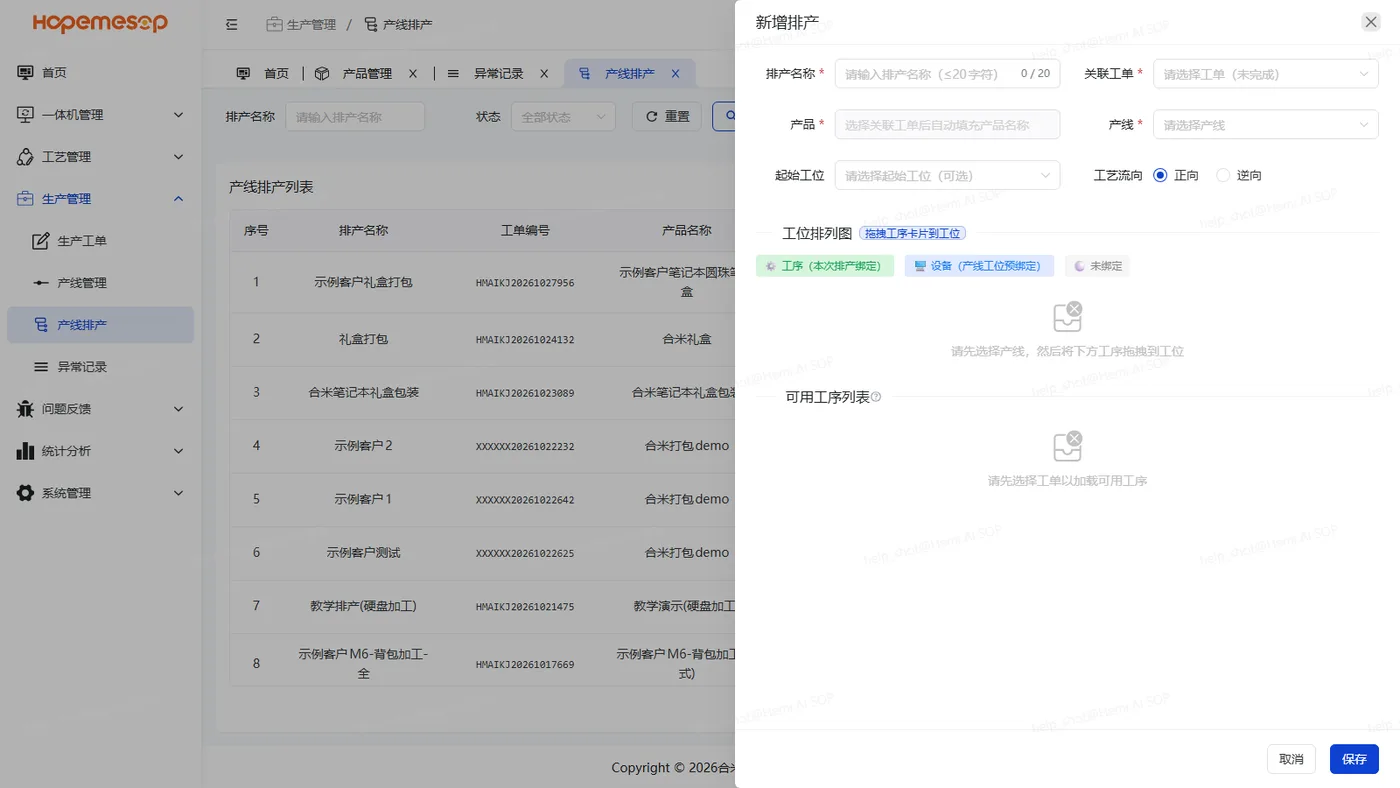
| Field | Notes |
|---|---|
| Schedule name | Up to 20 characters |
| Work order | Only unfinished ones can be chosen. Once chosen, the product and the operations of its released process are filled in automatically |
| Production line | Lines already in production can be chosen too |
| Start station, process flow direction | Optional. The direction is forward / reverse |
Stations without a workstation show "未绑设备,不能排" (No device bound, cannot schedule)
First go to line management and click 捆绑设备 (Bind device). See Maintain lines and stations.
How to check it is scheduled
After saving, both the line and the work order change to "生产中" (In production). The workstation loads this operation automatically, and the worker can tap 开始生产 (Start) to begin.
Schedule actions
Row actions appear depending on status: 启动 (Start), 暂停 (Pause), 恢复 (Restore), 完成 (Done), 编辑 (Edit), 删除 (Remove).
- One line can run several work orders at the same time. You can switch between them in the workstation's page header. The same work order cannot be scheduled twice.
- Pause and resume take effect at the workstation's next heartbeat (30 to 60 seconds).
- Pause is a "soft pause": no new piece can be started, and it stops only after the current piece is finished. On the workstation, 开始生产 (Start) changes to "排产已暂停" (Schedule paused).