
Create work orders
A work order says which product to make this time and how many. Schedules belong to a work order. This page covers how to add a work order, report progress and mark it as done.
Add a work order
- Open 生产管理 (Production) › 生产工单 (Work orders).
- Click 新增 (Insert): choose the product, fill in the quantity, and choose the type (客户订单 (customer order) / 库存备货 (make to stock)).
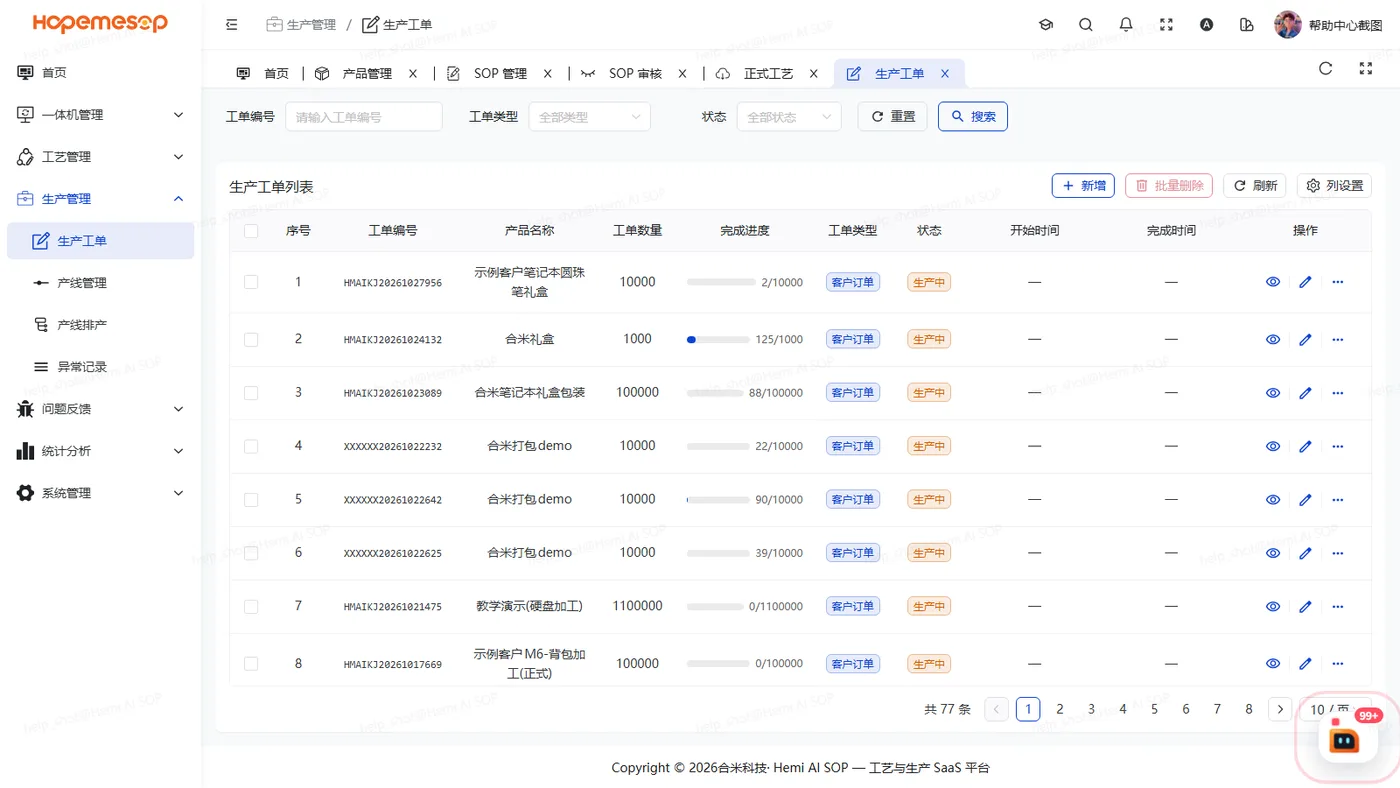
How progress is counted
- Each piece a workstation finishes adds 1 automatically.
- You can also click 上报进度 (Report progress) by hand. It works alongside the workstation's automatic count and is not counted twice.
- Once the total reaches the target, the order completes automatically.
In Report progress, enter the quantity added this time
Not the running total.
Mark as done
标记完成 (Mark as done) forces the work order to complete.
If there is still quantity left, its schedules and lines are closed too
This cannot be undone.
Delete
Only work orders that have not started can be deleted. Scheduled ones cannot be deleted.