
Submit and review a process
An SOP process must pass review before it becomes a released process that workstations can use. This page covers how to submit for review and how the reviewer approves or rejects it.
Before you start
Check the checklist in the right column of the editor first, and submit only when it is all green. See Fill in operation basics.
Submit for review
Use either of these:
- 发起审核 (Start review) in a row of the SOP 管理 (SOP Drafts) list;
- 提交审核 (Submit for review) in the top bar of the editor.
If you have unsaved changes, it stops you and asks you to save first. If the checklist has red problems, the submission is rejected.
Review
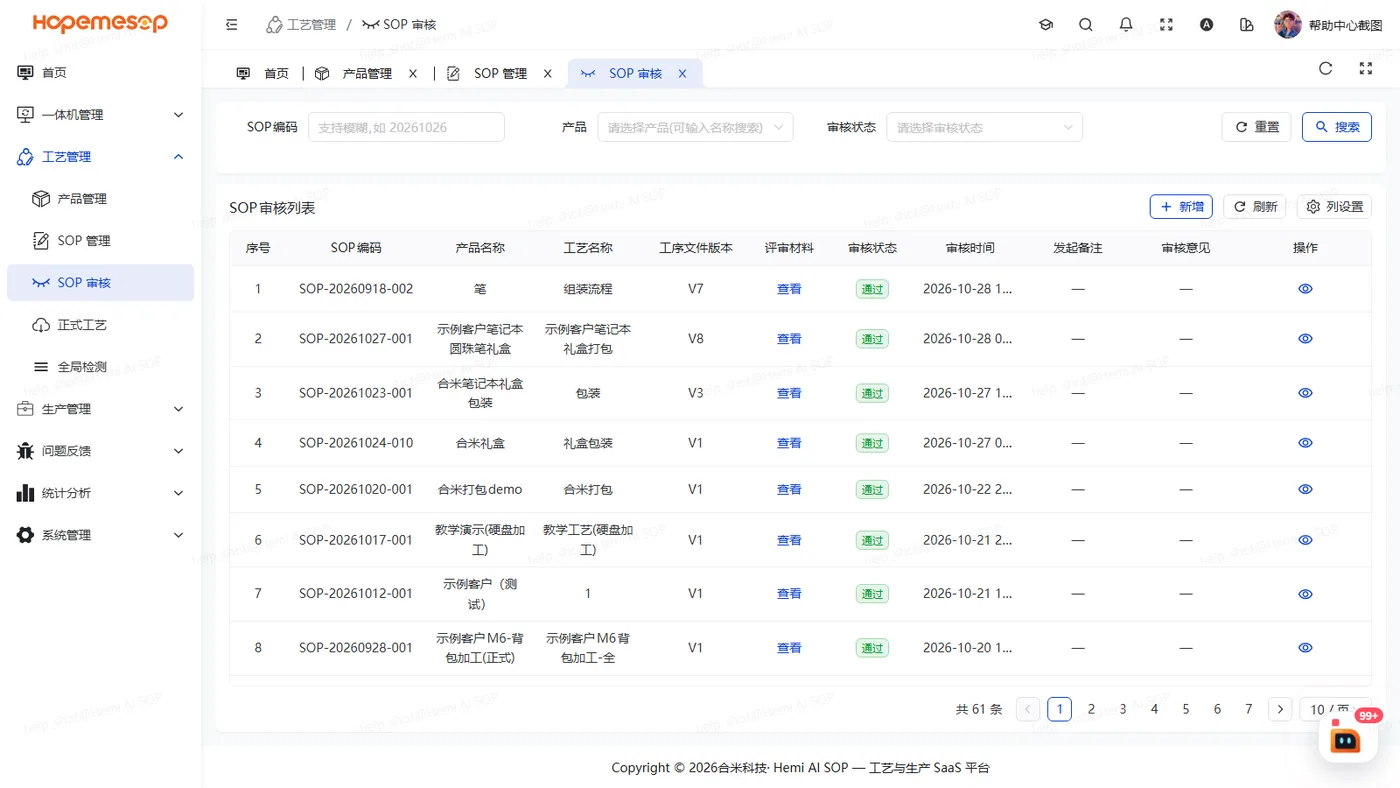
- Open 工艺管理 (Craft) › SOP 审核 (SOP Audit).
- Find the SOP process waiting for review and click 通过 (Pass) or 不通过 (Reject).
| Action | Notes |
|---|---|
| 通过 (Pass) | The review comment is optional. It shows "审核通过,正式工艺已生成" (Review approved, released process created) |
| 不通过 (Reject) | A reason is required, up to 300 characters |
Approval cannot be undone
Approving creates the released process. To change it later, see Change a released process.
Notes
- An SOP process under review can be neither edited nor deleted. An orange banner shows at the top of the page. To change it, first settle the review here (pass or reject).
- It is best to give the review permission to someone other than the person who builds the process. See Understand what each account can see.